

So here's my problem, i've tried to DL this Microsoft Service Pack 2 update over and over again since it's been available, and every time it stops at 12% and gives me an error. I already have the SP1 update which is required to DL the SP2, so i know that's not the issue.
I'm getting Update Error 80070020, which is some kind of timing issue or non-compatibility with my anti-virus software. I tried everything i could find online and none of the 5 things i tried did the trick. Here's what i've tried....
Restart the PC and try again.
Start in safe-mode, with network support and then install.
Manually perform a clean boot and restart with only windows operations running, then try to install.
Disable spyware and antivirus softwares temporarily and try to install.(Even tried removing the programs from my computer entirely and still didn't work)
Disable spyware, antivirus, and all firewalls and try to install.
Even after these steps, i went to the MS website and tried to manually install Service Pack 2 only to get the same error. All of these had the exact same error, except the safe boot method which wouldn't even let me run windows updater.
Normally i'd go on with my life and not give a damn about this update. However, i was kinda hoping to get in on the FFXIV open beta. Unfortunately, the beta installation requires SP2 to be installed........so basically i'm S.O.L. if i don't figure out the problem.
Anybody that's good with vista have some valuable input that might help? I would just switch to windows 7 if i had the cash, but i don't so that option is not available.
Windows Vista 32-bit Update Installation Error....

Windows Vista 32-bit update installation error....


Uninstall vista, case closed!
I'm even beeing serious. Vista is the most horrible operation system ever released, you'd be better of with windows 95 even.
Aside from that, I dont know the answer to your problem. Sorry.
I'm even beeing serious. Vista is the most horrible operation system ever released, you'd be better of with windows 95 even.
Aside from that, I dont know the answer to your problem. Sorry.
haha ok, if i can find my windows xp disc from my old PC i'll do that.....but that's a big if at this point since i've moved like 4 times in the last 2 years and all my ***is boxed up
Can always torrent XP, and I think there's even cracked windows 7 out there now as well.

This is tempting for me to do too, Vista is aggravating.
i've never changed the OS on any of my computers so it's unfamiliar territory to me. how do i go about backing up all my data without a flash drive or any other external memory available?
My brother was selling windows 7 awhile back, thats how I got my copy.
My computer have never been infected with vista, I went straight from XP > 7.
My dad though, he bought vista as soon as it came out, and he's had nothing but problems with it.
Windows 7 seems to kind of be a mix of vista and XP, where they have taken the best parts of the 2 operating systems and merged them. However, I'm not a computer geek, so don't quote me on that :D
My computer have never been infected with vista, I went straight from XP > 7.
My dad though, he bought vista as soon as it came out, and he's had nothing but problems with it.
Windows 7 seems to kind of be a mix of vista and XP, where they have taken the best parts of the 2 operating systems and merged them. However, I'm not a computer geek, so don't quote me on that :D
Hades.Blevien said:
i've never changed the OS on any of my computers so it's unfamiliar territory to me. how do i go about backing up all my data without a flash drive or any other external memory available?
If you are upgrading to windows 7, I believe you can transfer files and settings. It's a bit more tricky when downgrading though. iirc microsoft dont like it when people are downgrading, and wont let you install XP unless you have completely removed vista from your HDD first, which means and external HDD would be very nice.
They are kind of cheap now a days, and they're really nice to use as back ups.

WAT Remover(Removes the windows genuine advantage)
Windows 7 x64 Bit OEM DVD
Windows 7 x86(32bit) Home Premium
Magic ISO burning software
Just a heads up, when using these without a key, you can download just about any update, EXCEPT KB971033.
Windows 7 x64 Bit OEM DVD
Windows 7 x86(32bit) Home Premium
Magic ISO burning software
Just a heads up, when using these without a key, you can download just about any update, EXCEPT KB971033.
awesome, thanks a bunch! are all 4 of those DLs needed and is there any specific order they need to be installed?
Well, I posted 2 different operating system versions. Depending on what CPU you have, you can probably just go with the 64 bit version. So download 3/4 of those. Magic ISO is a burning software that allows you to burn ISO images onto DVD's. The WAT remover is used after you install your OS, this removes the need for a CD key. You may also need a extraction program such as WIN RAR or 7 Zip.
If you want, I can check out your PC now that I have nothing to do with the update going on.
TeamViewer5
Let me know if you decide to do it, then you can PM me certain info. Do NOT post the info that teamviewer gives you into the public forum. This software is a remote assistance program.
TeamViewer5
Let me know if you decide to do it, then you can PM me certain info. Do NOT post the info that teamviewer gives you into the public forum. This software is a remote assistance program.
dang, if i had a bit more time i'd let you check it out but i have to meet my woman for her lunch break in about 45min since i'm already off work for the day lol.
will give the windows 7 install a try and let you know if i have any problems though. thanks again for the help!
will give the windows 7 install a try and let you know if i have any problems though. thanks again for the help!
Make sure you go to your manufacture's website for your PC, and download the drivers for Win 7 64 bit ahead of time. Windows 7 usually takes care of most of the basic drivers, but things like chipset drivers, sound drives, maybe video need to be installed.
I could use this help too, actually. < .<
For some reason, things like runtime don't seem to work on my computer. If I could fix that, I wouldn't need to upgrade/downgrade.
For some reason, things like runtime don't seem to work on my computer. If I could fix that, I wouldn't need to upgrade/downgrade.
Java specific, or other applications as well?
Also if you are still using vista, you really should upgrade to 7.
Also if you are still using vista, you really should upgrade to 7.
I think I'll repost this PC maintenance thread I posted over in my LS's website. It has a very PC user friendly way of using the software and I even tossed some pics in there for safe measure.
NOTE TO ADMINS: If any of the stuff that I post is deemed to not be suitable, please remove my posts. However I should state that these are links to sites that contain a torrent, and not the actual file.
NOTE TO ADMINS: If any of the stuff that I post is deemed to not be suitable, please remove my posts. However I should state that these are links to sites that contain a torrent, and not the actual file.
Well, for instance, I can't run the FFXIV Beta installer. This is one application that triggers the runtime error.
Would upgrading fix it? If so, I'll just do that, probably.
Would upgrading fix it? If so, I'll just do that, probably.
So several people have complained about their PC's being slow, and laggy. I will be posting a guide on how to do some really simple maintenance using the same tools that Best Buy Geeksquad uses.
First off, the file is called the MRI Utility Disc. This is the same software that is used at Best Buy by the GeekSquad. It is a very simple program without too many complicated things, as long as you know which buttons to push :P
You can obtain this software via a torrent. To download torrents, you need either limewire, or frostwire, or some other Bit torrent client. My personal choice is Vuze:
http://www.vuze.com/
**************USE VUZE- TESTED WITH LIMEWIRE: SPEEDS ARE SLOOOOOOWWWWWWWWW***************
Once you have installed Vuze, or if you have a different P2P client. You may now download the torrent file for the MRI, and a program called Magic ISO.
MRI:
http://www.kickasstorrents.com/geek-squad-mri-5-1-1-0-cracked-by-soldierx-t3343755.html
Magic ISO:
http://www.kickasstorrents.com/magic-iso-maker-5-4-with-serial-t453800.html
You may also need WIN RAR in order to extract the MRI files and form them into one ISO file.
http://www.rarlab.com/download.htm
Choose the one appropriate to your OS version.
WinRAR x86 (32 bit) 3.93 http://www.rarlab.com/rar/wrar393.exe
WinRAR x64 (64 bit) 3.93 http://www.rarlab.com/rar/winrar-x64-393.exe
So things you will need:
1 Blank CD or DVD
1 MRI ISO Image (Mri torrent)
1 Magic ISO ( To burn the image)
1 Winrar ( to extract the image)
1 P2P client ( To download the torrent)
****************will continue post****************
First off, the file is called the MRI Utility Disc. This is the same software that is used at Best Buy by the GeekSquad. It is a very simple program without too many complicated things, as long as you know which buttons to push :P
You can obtain this software via a torrent. To download torrents, you need either limewire, or frostwire, or some other Bit torrent client. My personal choice is Vuze:
http://www.vuze.com/
**************USE VUZE- TESTED WITH LIMEWIRE: SPEEDS ARE SLOOOOOOWWWWWWWWW***************
Once you have installed Vuze, or if you have a different P2P client. You may now download the torrent file for the MRI, and a program called Magic ISO.
MRI:
http://www.kickasstorrents.com/geek-squad-mri-5-1-1-0-cracked-by-soldierx-t3343755.html
Magic ISO:
http://www.kickasstorrents.com/magic-iso-maker-5-4-with-serial-t453800.html
You may also need WIN RAR in order to extract the MRI files and form them into one ISO file.
http://www.rarlab.com/download.htm
Choose the one appropriate to your OS version.
WinRAR x86 (32 bit) 3.93 http://www.rarlab.com/rar/wrar393.exe
WinRAR x64 (64 bit) 3.93 http://www.rarlab.com/rar/winrar-x64-393.exe
So things you will need:
1 Blank CD or DVD
1 MRI ISO Image (Mri torrent)
1 Magic ISO ( To burn the image)
1 Winrar ( to extract the image)
1 P2P client ( To download the torrent)
****************will continue post****************
**********WARNING- This is a full diagnostic of your PC, it can take up to 8 hrs to finish depending on the size of your Hard drives and how fast your processor is. I suggest doing this overnight while you are asleep, or while you are at work**************
When you install magic ISO, there is a text document within the folder with the key and user name used to register the product. When you first use Magic ISO, you will encounter a window that has a REGISTER button, hit that, open up the text doc located in the folder, copy and paste the key and user name in the appropriate slots :)
WinRAR is simply a extraction tool, similar to winzip and many other apps. This is what is used to open the file.
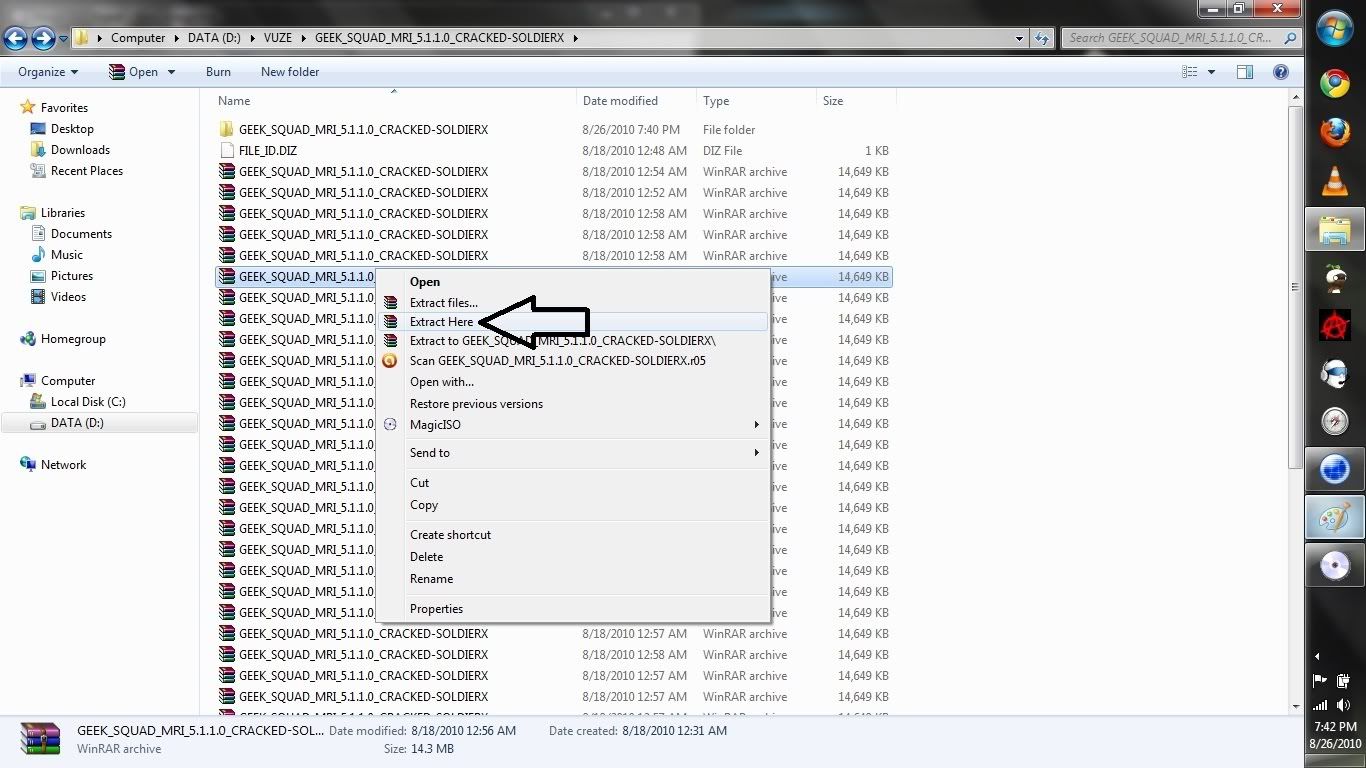
Once you have installed WinRAR, and you have downloaded all the necessary files, when you go to the folder with the Geeksquad MRI disc in it, it will look like this. A bunch of little files.
You can RIGHT CLICK on any file that has the winrar icon and extract here.
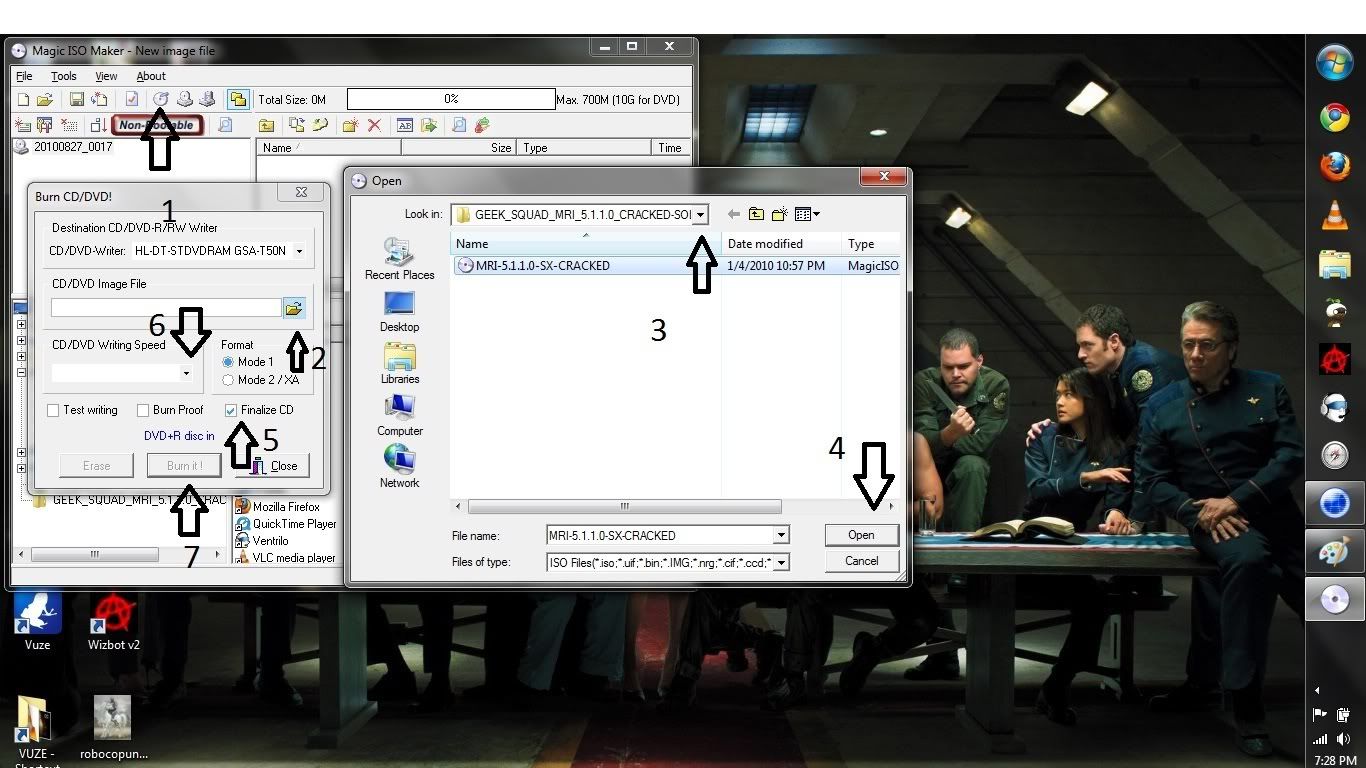
Ok. Once you have extracted your new MRI ISO image file, you will open up Magic ISO Maker and be ready with a blank DVD or CD.
1: Hit the WRITE CD icon.
2: Select the folder where you extracted your MRI ISO IMAGE FILE.
3: Choose the correct area
4: Pick the file and hit OPEN
5: Check the FINALIZE CD box
6: Select your BURN SPEED ( Have the DVD or CD inserted first)
7: Burn!
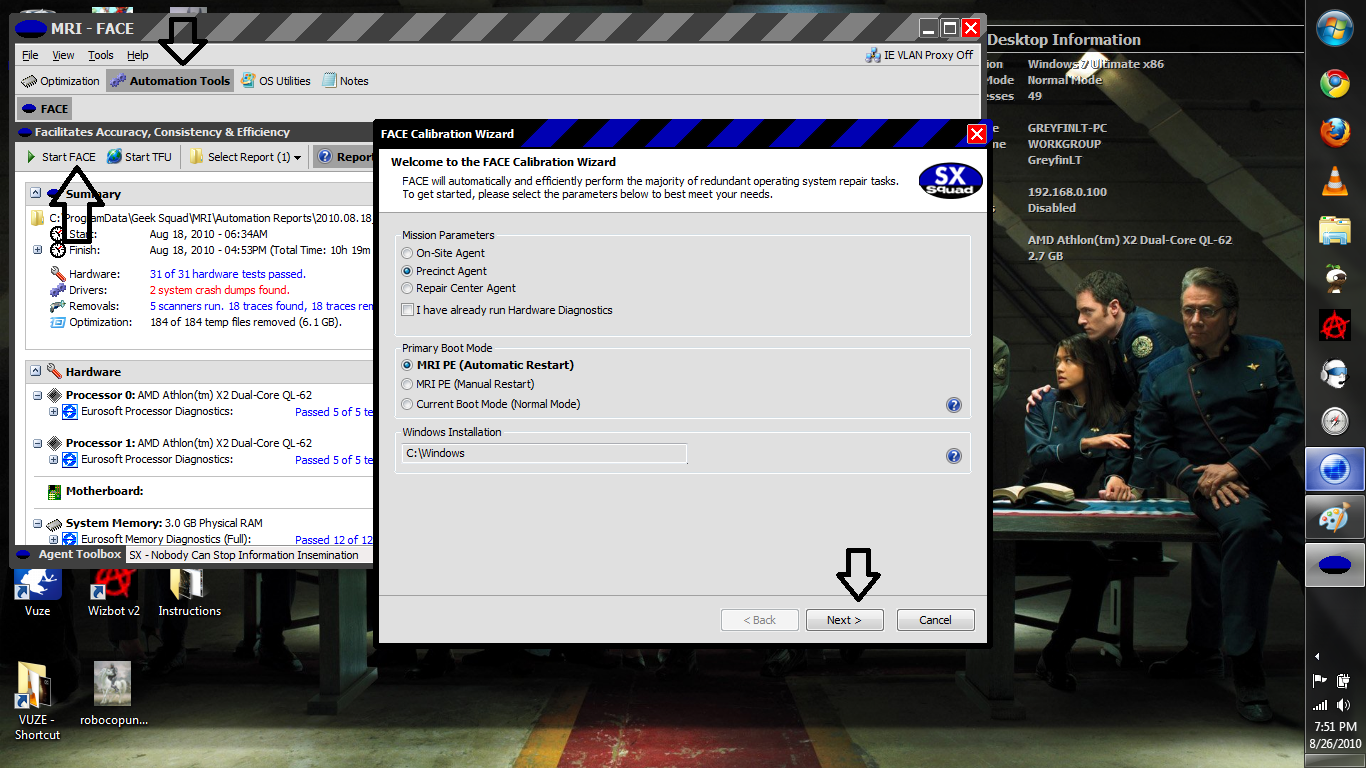
Next we get to the actual MRI usage. The first few screens are very basic, go to AUTOMATION TOOLS , then START FACE.
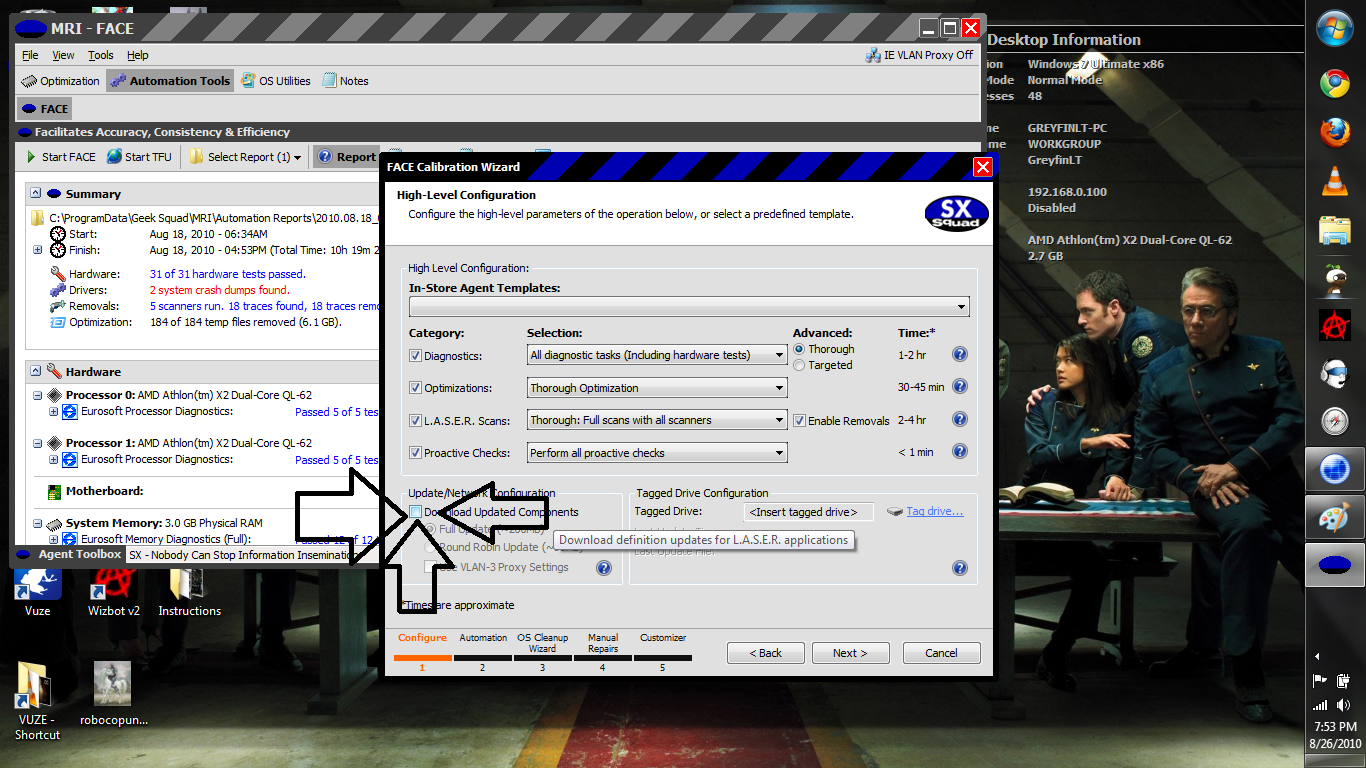
Then, THIS IS IMPORTANT, unclick the box that says UPDATE COMPONENTS. I put lots of arrows, so you can't miss it.
After this screen, just hit next a few times, your system will restart, and it will load into a special environment. It will look a lot like the one you just saw, and it should automatically start doing the tests and diagnostics. If not, it should bring you to a menu similar, and just do the same thing as the last too screenshots.
If you have any questions, feel free to post and i'll help you out.
When you install magic ISO, there is a text document within the folder with the key and user name used to register the product. When you first use Magic ISO, you will encounter a window that has a REGISTER button, hit that, open up the text doc located in the folder, copy and paste the key and user name in the appropriate slots :)
WinRAR is simply a extraction tool, similar to winzip and many other apps. This is what is used to open the file.
Once you have installed WinRAR, and you have downloaded all the necessary files, when you go to the folder with the Geeksquad MRI disc in it, it will look like this. A bunch of little files.
You can RIGHT CLICK on any file that has the winrar icon and extract here.
Ok. Once you have extracted your new MRI ISO image file, you will open up Magic ISO Maker and be ready with a blank DVD or CD.
1: Hit the WRITE CD icon.
2: Select the folder where you extracted your MRI ISO IMAGE FILE.
3: Choose the correct area
4: Pick the file and hit OPEN
5: Check the FINALIZE CD box
6: Select your BURN SPEED ( Have the DVD or CD inserted first)
7: Burn!
Next we get to the actual MRI usage. The first few screens are very basic, go to AUTOMATION TOOLS , then START FACE.
Then, THIS IS IMPORTANT, unclick the box that says UPDATE COMPONENTS. I put lots of arrows, so you can't miss it.
After this screen, just hit next a few times, your system will restart, and it will load into a special environment. It will look a lot like the one you just saw, and it should automatically start doing the tests and diagnostics. If not, it should bring you to a menu similar, and just do the same thing as the last too screenshots.
If you have any questions, feel free to post and i'll help you out.
Hope this helps you some, this tool pretty much does most of the work for you without really having to do anything. BUT! I still think you should move onto Windows 7. Vista really is just a piece of crap :x
I'll go grab some CDs to do this stuff after my job interview today and try it out.
What kind of CD/DVD do you use for this kind of thing? < .<
What kind of CD/DVD do you use for this kind of thing? < .<
A blank CD works fine with MRI. It's about 600 MB, so it easily fits on a 700 MB CD R. You can use a DVD too if you want, the choice is yours.
So pretty much any writable. Gotcha. Thanks.
Yup, all these downloads are very fast btw, there are a good amount of seeders for all of them!
Darn, I ran this through the night and it didn't do anything I wasn't already maintaining myself.
Looks like I'm gonna go the Windows 7 route.
I assume I make a CD with the Windows 7 ISO? I only need the CD image portion, right?
Looks like I'm gonna go the Windows 7 route.
I assume I make a CD with the Windows 7 ISO? I only need the CD image portion, right?
All FFXI content and images © 2002-2026 SQUARE ENIX CO., LTD. FINAL
FANTASY is a registered trademark of Square Enix Co., Ltd.