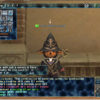
Notice in the screenshot that mainly the letter M and I's seem very jagged. I've become so used to the look that I no longer notice them on my items so I didn't screenshot those.
To answer the other question, I don't plan on playing this game @ 4:3 ratio on a widescreen monitor =0
Disregarding reading anyone elses posts at the moment, are you playing in true full screen or in a window most of the time? That appears to be a window. Are you scaling this window at all? Adjusting the size of it will cause weird skewing effects and artifacts if you're making it smaller.
If you want a full screen effect without much alteration in graphics, it's usually a nice idea to have the overlay resolution set to what your desktop resolution is and get rid of the borders via windower settings.
I play with windower, windowed, then extended to fit the screen at my monitor's resolution. The problem is, since it has a bar up top, as well as my start bar below, the resolution isn't exactly as it should be, which causes the text to distort ever so slightly. Is there an easy (and precise) way to calculate my actual game window size to make the text not distort, or should I just play fullscreen/play in a smaller window and not extend it?
I prefer having the game take up the screen with the start bar easily accessible at the bottom if I need to pull up the intarwebs or something. Just a habit *shrug*.
Should learn to just rely on ALT+TAB! Nah, if you want to send me a screenshot of your current layout, I should be able to spit out a setting you can use. Can also make XI borderless if you want. You don't want to be doing any manual resizing of the window.
Sometimes certain terrain objects don't render fully until your really close to them - for example, fauna in Meriphataud Mountains. This gives the odd appearance of plants "lighting up" as you get closer to them. At first I thought it was an issue with ambient lighting, but it seems to be more a texture/detail thing.
I have Mip Mapping set to 6, which I thought would prevent that...
This is just how zones are programmed to load in objects once you get closer to them and there currently isn't any way to change this. Does the term LOD models ring any bells to you? Objects/models whatever, will have a distant "LOD" model that loads in when the object is far enough that has lower amount of polygons and usually lower textures to try and save resources.
Changed the backround resolution to match that of my screen resolution and it has made a HUGE difference. I run FFXI on two computers, my laptop (Vista) and my old computer (XP). I assumed the old computer just had bad graphics. I opened up advanced settings in the windower start window and imported the settings. Turns out the background was running at half the settings of my main computer. Made them match and even my wife said 'wow.' +1 to this thread!
Changed the backround resolution to match that of my screen resolution and it has made a HUGE difference. I run FFXI on two computers, my laptop (Vista) and my old computer (XP). I assumed the old computer just had bad graphics. I opened up advanced settings in the windower start window and imported the settings. Turns out the background was running at half the settings of my main computer. Made them match and even my wife said 'wow.' +1 to this thread!
instead of making them match, try doubling them for even better results.
ie; if your main resolution is set at 1024 x 768 then change your background resolution to 2048 x 1600
Notice in the screenshot that mainly the letter M and I's seem very jagged. I've become so used to the look that I no longer notice them on my items so I didn't screenshot those.
To answer the other question, I don't plan on playing this game @ 4:3 ratio on a widescreen monitor =0
Disregarding reading anyone elses posts at the moment, are you playing in true full screen or in a window most of the time? That appears to be a window. Are you scaling this window at all? Adjusting the size of it will cause weird skewing effects and artifacts if you're making it smaller.
True Full Screen? I'm not entirely sure. All I know is my background and windower resolution is set at 1680 by 1050, when the game loads, i feel windows7 resizes the window and I'm not sure why or if there is a way to disable that along with the stupid huge window-bar. I don't adjust it, I simply position it so it covers the screen. Sometimes I double-click the window-bar and it looks like it does resize it, which may cause it to skew the effects. I guess I'm not used to Win7 as I did this on WinXP and I had none of the skewing effects when I did so. How are people doing it on Win7 ? =0
True Full Screen? I'm not entirely sure. All I know is my background and windower resolution is set at 1680 by 1050, when the game loads, i feel windows7 resizes the window and I'm not sure why or if there is a way to disable that along with the stupid huge window-bar. I don't adjust it, I simply position it so it covers the screen. Sometimes I double-click the window-bar and it looks like it does resize it, which may cause it to skew the effects. I guess I'm not used to Win7 as I did this on WinXP and I had none of the skewing effects when I did so. How are people doing it on Win7 ? =0
What is your desktop resolution?
If your desktop resolution is something like 1024 x 768 and you're opening Windower @ 1680 x 1050, then yeah - it might crush the window down to fit inside your screen (or the window would be cut off, not sure which)...
If you don't know how to check your screen resolution, right click on your desktop and select "Screen Resolution".
If you are playing on a widescreen TV, your screen resolution should be 1280 x 720 or 1920 x 1080 - depending on your TV (720i or 1080i... mine is 720i and setting it to 1900 x 1080 would make text a nightmare to read.
Quote:
ie; if your main resolution is set at 1024 x 768 then change your background resolution to 2048 x 1600
this only happen to me if i run ffxi in windower mode in the main ffxi config which adds the windows boarders you can run it without which doesn't squeeze the text however you won't be able to minimize your ffxi screen it inless you click show desktop button. I best suggest playing with your resolutions to unconventional sizes like x 1680 to fit across your screen and 1000 to fit on the bottom.
this only happen to me if i run ffxi in windower mode in the main ffxi config which adds the windows boarders you can run it without which doesn't squeeze the text however you won't be able to minimize your ffxi screen it inless you click show desktop button. I best suggest playing with your resolutions to unconventional sizes like x 1680 to fit across your screen and 1000 to fit on the bottom.
True Full Screen? I'm not entirely sure. All I know is my background and windower resolution is set at 1680 by 1050, when the game loads, i feel windows7 resizes the window and I'm not sure why or if there is a way to disable that along with the stupid huge window-bar. I don't adjust it, I simply position it so it covers the screen. Sometimes I double-click the window-bar and it looks like it does resize it, which may cause it to skew the effects. I guess I'm not used to Win7 as I did this on WinXP and I had none of the skewing effects when I did so. How are people doing it on Win7 ? =0
What is your desktop resolution?
If your desktop resolution is something like 1024 x 768 and you're opening Windower @ 1680 x 1050, then yeah - it might crush the window down to fit inside your screen (or the window would be cut off, not sure which)...
If you don't know how to check your screen resolution, right click on your desktop and select "Screen Resolution".
If you are playing on a widescreen TV, your screen resolution should be 1280 x 720 or 1920 x 1080 - depending on your TV (720i or 1080i... mine is 720i and setting it to 1900 x 1080 would make text a nightmare to read.
Quote:
ie; if your main resolution is set at 1024 x 768 then change your background resolution to 2048 x 1600
2048 x 1536
Desktop is 1680 by 1050, and I play ffxi on that exact same res. I've used (x2) 3360 x 2100, and I get jagged txt. If I do (x1.5) 2520 x 1575 I still get jagged edges. IN FACT, something I noticed yesterday, even POL launched has some jaggedness. I'm going to try and update my video card drivers. I still think this is Win7 related.
I simply run it as a window that is exactly the same size as monitor (1920x1200). Looks great and you can't tell the difference if you were just looking at it. No borders or anything. When you alt tab, it brings up your other windows without the lag/blinking that usually accompanies a full screen app being alt tabbed.
True full screen is dumb imo, don't know why anyone would ever want it to be honest. Just match desktop and alt tab to get to other windows (unless you run dual monitors, then you just click off to the side).
I run at 1920 X 1080 and over-sampled (2x) the BG resolution and it does look fantastic and performs great.
However, I did notice that the greater the over-sampling in WS format, the further the on-screen damage/miss notices "shift" left/right (in relation to my character and target mob.) At 1920 X 1080 the numbers are right above the in-game figures' heads, but the larger the oversampling setting gets (up to 2x) the more it gets displaced.
It got to the point where when I was fighting, the flashing damage numbers were so far off-screen that they made me worry some mob was attacking me from behind while I fought. :p
But eh, for me, I like the crisper image and just learned to live with it. I didn't turn them off so I could still see the !! notices in abyssea. :p
I simply run it as a window that is exactly the same size as monitor (1920x1200). Looks great and you can't tell the difference if you were just looking at it. No borders or anything. When you alt tab, it brings up your other windows without the lag/blinking that usually accompanies a full screen app being alt tabbed.
True full screen is dumb imo, don't know why anyone would ever want it to be honest. Just match desktop and alt tab to get to other windows (unless you run dual monitors, then you just click off to the side).
This is how I've done it for the past 5-6 years since I started using windower. Highly recommended.
give this a try 1660x960 i played with res till it fit top and bottom screen size login text didn't look jadgged running window 7 only different from xp to window 7 is the display manger built into the os so it will strech image not to cover the start menu if you hid the start menu and not double click the top window to max the window the text will look like it should at 1680x1050 but when you double click you noticed that window automaticaly resize the window which streches the image.
make your overlay smaller (800x600 or somewhere along those lines) if you prefer larger text font, because sadly, the gui itself does not increase in size as you enlarge the window size
windowed, i run on overlay and registry 960x600, and i enjoy it
unfortunately, even if you went and bumped your registry to x2 your overlay, the game graphics-wise looks practically the exact same as it does x1 registry with lower overlay resolutions, so to save you the time and trouble, i recommend keeping your registry resolution x1 to your overlay so you can dual-box more efficiently if ever such an occurrence arises (or otherwise allow yourself to run other things on your computer without ffxi slowing down immensely)
oh i see thx a lot again my eyes are happy now, i can have more than 15 min playing whit this new reso.
i still need fix tons of thinghs my draw distance isnt working and cant use macros atm, need find how to fix it =p
Sorry for the necro, but Im ready to punch thru my screen.
This PC is connected to a 37" Samsung thru an HDMI Cord. Current res is 1920x1080 (Also been playing with 1600x1200).
Currently I have windower gui set at overlay 1920x1080 and background 3840x2160 X64 and border less. When I run it I can see FFXI on the menu screen and that's it so basically I can see 1/4 of the menu screen.. Any help would be great...
Ps. If I put it on bordered it just looks awful. I had this pc set beautifully at one point in time.. I just don't know how to get back there..
I'm having a similar problem with the graphics. My PC is more than capable of running FFXI at full blast. However, even with all the changes the wikipedia page has suggested my game still looks kinda crappy. I'm not sure what else I could do or if I'm doing something wrong >_>;
Well I figured it out. My Gf changed my icon/screen setting to 150% for desktop icons. I did not think that would also effect my ffxi. I put that back to 100% and its perfect.
I just do as everyone else always suggest. Open windower GUI make your Overlay exaclty what your screen res is. Double it and type it into the background x and y under advance. Then make sure its on smooth and uncompressed. Never had a issue with it until now.